 Skip to content
How to Fix Car Stereo Battery Diagnose, Prevent, and Solve Power Drain Problems

Car stereo battery drain, often caused by parasitic draw, happens when electrical components continue to pull current after the vehicle is switched off, leaving owners with a flat battery and unreliable starts. This article teaches practical diagnostics, step-by-step multimeter tests, wiring and fuse corrections, software and sleep-mode fixes, and when a battery upgrade is the right long-term solution for aftermarket car audio. You will learn how parasitic draw is measured in milliamps (mA), how to isolate offending circuits, and what wiring or configuration mistakes most commonly cause stereo-related drain. The guide also outlines preventive maintenance and configuration tweaks to reduce recurrence, with targeted advice for Android and other aftermarket head units that resist sleeping. Finally, the article covers escalation paths—when DIY is insufficient—and how specialist lithium options like LTO SCiB banks can help high-discharge audio systems maintain voltage stability. Read on for diagnostic tables, wiring best-practices, and practical checklists to fix and prevent car stereo battery drain.
What Causes Car Stereo Battery Drain and Parasitic Draw?
Parasitic draw is the continuous current that flows from a vehicle battery when the ignition is off, and when excessive it discharges the battery faster than the alternator or charger can replenish it. Typical normal parasitic draw ranges are small (tens of milliamps) for modern vehicles, but aftermarket audio gear, faulty wiring, and sleeping head units can push that into hundreds of milliamps or more, causing dead batteries within days. Identifying the root cause requires separating normal vehicle systems from aftermarket loads and checking for wiring faults, incorrect 12V feeds, or failing components. Understanding these causes lets you choose the right diagnostic steps and fixes that follow, starting with a multimeter test and fuse-pull isolation. The next subsections define parasitic draw in context and explain how wiring and aftermarket components create risk.
What Is Parasitic Draw and How Does It Affect Car Audio Systems?
Parasitic draw is measured in milliamps (mA) and refers to any device that draws current while the car is off; minor draws (under about 50 mA) are usually normal for clocks and security modules. When audio components like amplifiers or head units stay powered, they can add hundreds to thousands of milliamps, leading to voltage sag, poor cranking, and repeated no-start incidents. Voltage sag under load reduces audio performance and can damage sensitive electronics over time, so identifying a persistent high draw is critical for both reliability and protecting components. The following section explains how to detect that draw using a multimeter and fuse-pull techniques to isolate the offending circuit.
This research highlights how improper network management between ECUs can lead to parasitic battery drain, a critical consideration for modern vehicles.
How Do Faulty Wiring and Aftermarket Stereos Contribute to Battery Drain?
Faulty wiring often means constant 12V feeds are connected where switched 12V should be, remote-turn-on wires are misused, or grounds are poor, creating unintended standby power paths for head units and amplifiers. Aftermarket stereos—especially Android-based units—may run background services, keep USB power active, or fail to enter a true sleep state if wired incorrectly or if firmware bugs prevent shutdown. Short circuits and poor grounds can also create parasitic paths that draw significant current and heat components, increasing risk of fuse failures or battery damage. Correcting wiring and ensuring proper switched vs constant feeds are primary fixes before considering battery replacement, and the next H2 shows how to diagnose these issues.
How Can You Diagnose Car Stereo Battery Drain Effectively?

Effective diagnosis combines a methodical multimeter test, fuse-pull isolation, and observation of symptoms such as slow cranking or amps that remain warm after shutdown. Start with a baseline battery voltage and then measure current draw in series with the negative battery terminal, recording expected values and using a systematic fuse-pull approach to isolate the circuit responsible. Safety is critical: disconnect accessories, avoid bridging fuses inadvertently, and follow correct multimeter settings to prevent blowing meters or fuses. The diagnostic matrix below summarizes common tests, their tools, expected readings, and interpretation to guide each step of the troubleshooting process. After learning the tests, the following H3 gives a numbered multimeter procedure and common pitfalls.
How to Use a Multimeter to Detect Parasitic Draw Step-by-Step?
Follow a clear, numbered procedure to measure parasitic draw safely and reliably using an automotive multimeter with a milliamp range or an inline clamp meter suitable for DC. Begin by fully charging the battery and removing all keys and doors closed to let modules enter sleep; record baseline battery voltage, then disconnect the negative battery terminal and connect the multimeter in series between the negative post and the cable, ensuring meter leads are in the correct jacks and range. Read the current in milliamps; values below roughly 50 mA are normal for many vehicles, while values above 100–200 mA indicate excessive draw and require fuse-pull isolation. If a high draw is found, pull individual fuses and note when the reading drops—this isolates the circuit—and use that information to target the offending device or wiring for repair. Take care to avoid powering devices while moving fuses and shield meter leads from shorting.
Understanding the fundamental principles and practical application of multimeters is essential for accurately diagnosing automotive electrical issues.
Multimeter parasitic draw test steps:
- Prepare: Fully charge battery and close doors to allow sleep modes.
- Disconnect: Remove negative battery cable and connect multimeter in series.
- Measure: Read milliamps on the correct range and record.
- Isolate: Pull fuses one at a time to find the circuit that reduces draw.
- Verify: Reconnect and re-test after repairs to confirm normal draw.
This numbered procedure helps locate the circuit quickly and reduces wasted time chasing symptoms without isolation.
What Are the Signs of Battery Drain in Car Audio Systems?
Symptoms of audio-related battery drain include slow or no crank, dim interior or instrument lights immediately after sitting, repeated dead batteries within days, and components like amplifiers remaining warm when the vehicle has been off. Audio-specific indicators include head units that display after shutdown, amplifiers that click intermittently or never reach full sleep, and USB ports or RGB lighting staying powered when they should be off. A quick in-car checklist—observing unit displays, feeling amplifier enclosures for warmth, and checking accessory power behavior—can prioritize circuits to test with a multimeter and fuse pull. Use these observable signals as decision triggers for deeper diagnosis and the isolating tests described earlier.
Before moving to corrective actions, refer to the diagnostic table above to choose the correct tools and interpret readings, then proceed to targeted wiring and configuration fixes discussed next.
This diagnostic matrix enables rapid, repeatable testing so technicians and hobbyists can isolate and prioritize repairs.
What Are the Best Solutions to Fix Car Audio Battery Drain?
Fixes range from simple configuration and wiring corrections to component replacement and battery system upgrades; the right solution depends on the source identified during diagnosis. Immediate corrective steps include moving accessories to switched circuits, fixing poor grounds, adjusting head unit sleep settings, disabling background apps on Android radios, and installing proper remote-turn-on wiring for amplifiers. For high-discharge setups or recurring deep discharges, installing a secondary battery or upgrading to a technology with superior voltage stability—such as LTO SCiB lithium banks—reduces the risk of voltage sag and repeated failures. The EAV comparison table below contrasts lead-acid, AGM, and LTO SCiB across capacity, discharge behavior, voltage stability, and cycle life to justify when a lithium upgrade is appropriate for performance audio installs.
How Does Proper Wiring and Fuse Selection Prevent Battery Drain?
Proper wiring prevents unintended standby power paths by ensuring constant 12V feeds only supply permanent needs and ignition-switched 12V feeds control head units and accessories. Fuse selection matters: fuses must be sized for the circuit they protect and positioned close to the battery for main feeds; using ANL/CNL or appropriately rated blade fuses with correct amp ratings helps prevent wiring damage and simplifies fault isolation. Use correct gauge wiring (larger gauge for high-discharge audio) and secure copper cable lugs and solid chassis ground points to avoid resistance-related voltage drops and heating. The short table below recommends component specs for common audio installations and explains the rationale for each choice.
Wiring and fuse best-practices list:
- Use switched 12V for head unit ignition circuits to prevent constant power draw.
- Size fuses at the battery end of main runs to protect wiring and simplify diagnostics.
- Select wire gauge based on total RMS current to avoid voltage drop and overheating.
Why Upgrade to LTO SCiB Lithium Batteries for Car Audio Power Stability?
LTO SCiB batteries are notable for rapid charge acceptance, exceptional cycle life, and stable voltage under high-discharge conditions, which are crucial for SPL competition systems and frequent deep-discharge usage. Compared to conventional lead-acid and AGM batteries, LTO SCiB chemistry delivers faster recovery between bursts of high current, minimizing voltage sag and maintaining consistent amplifier performance during extended runs. For users who repeatedly push audio systems hard or who experience recurring parasitic-related failures, a dedicated LTO SCiB secondary bank or replacement can be the most reliable long-term fix. Evolution Lithium Limited specializes in LTO SCiB lithium battery banks and related amplifiers and accessories designed specifically for high-discharge car audio needs, offering solutions that prioritize voltage stability, durability, and rapid recharge for competitive and daily-driver use.
How to Prevent Future Car Stereo Battery Drain Issues?
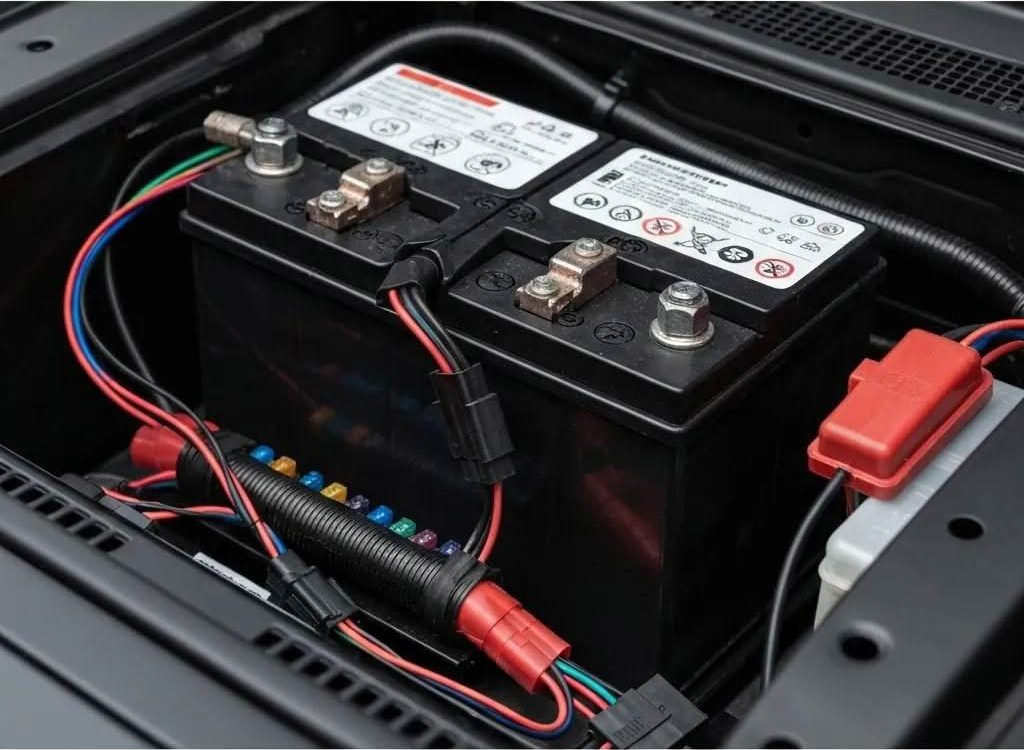
Prevention combines routine maintenance, correct configuration of head units and amplifiers, and choosing the right battery architecture for your use case. Regularly inspect and clean battery terminals, check alternator output, and test parasitic draw periodically—especially after installing new components—to catch incremental issues before they cause failures. Maintain wiring and connectors by using proper lugs, secure grounds, and heat-shrink where needed, and implement a simple maintenance schedule that includes voltage and health checks every few months. When the vehicle uses high-power audio or frequent deep cycles, consider secondary battery banks or high-cycle chemistries to reduce strain on the primary starter battery and ensure consistent power to audio systems.
What Maintenance Practices Keep Car Audio Batteries Healthy?
A quarterly or biannual maintenance routine prevents small issues from escalating into dead batteries by including voltage state-of-charge checks, terminal cleaning, and visual wiring inspections. Measure resting battery voltage to confirm state-of-charge and use an alternator output test while running to ensure the charging system replenishes the battery properly. Clean corrosion from terminals and ensure cable lugs are tight; loose or corroded connections increase resistance and can create heat or intermittent parasitic draws. Replace batteries showing reduced capacity or repeated inability to hold charge and keep a record of maintenance to help professionals diagnose chronic issues faster. The next subsection covers software and sleep-mode settings that often complement these hardware checks.
Maintenance checklist:
- Check resting voltage and alternator output every 3–6 months.
- Clean terminals and inspect wiring for corrosion or damage.
- Verify mounting and securing of secondary batteries and banks for vibration resistance.
How Can Adjusting Stereo Sleep Mode Settings Reduce Power Drain?
Many head units include sleep or standby timers that must be correctly configured to guarantee they stop drawing current after a set period; configuring these settings to a short timeout preserves the battery. Android-based stereos may run background apps or keep USB power active; disabling unnecessary apps, turning off persistent services, and applying firmware updates can restore proper sleep behavior. Test sleep behavior by shutting the vehicle, waiting the configured timeout, and measuring current draw to confirm the unit has entered low-power mode. If settings and firmware fail to stop the draw, wiring the head unit to a properly switched 12V feed or adding a relay that cuts accessory power can enforce the desired behavior. Ensuring both software and wiring cooperate provides the most reliable prevention.
Evolution Lithium Limited’s experience with high-discharge systems underscores that pairing proper sleep-mode configuration with a suitably specified battery bank reduces both software-related and load-related drain risks for performance audio installations.
How Do Aftermarket Car Stereos Specifically Cause Battery Drain?
Aftermarket stereos alter the vehicle’s electrical landscape by introducing components that may not adhere to factory sleep protocols, leaving systems partially powered when ignition is off. Many installers inadvertently wire constant 12V to a head unit that should be on a switched feed, or miswire the amplifier remote-turn-on so it remains energized. Android head units add complexity because background services, USB charging behavior, and app wakelocks can create persistent currents that standard car clocks do not. Understanding these behaviors helps differentiate installation mistakes from software bugs and directs the remedy toward wiring corrections, firmware management, or component replacement where necessary.
Can Android and Other Aftermarket Radios Drain Your Car Battery When Off?
Yes—Android radios can run OS-level processes or third-party apps that prevent full sleep, especially if USB power, Wi-Fi, or Bluetooth remain active; these features can keep processors and peripherals drawing current. Check for background services, power settings inside the radio’s Android interface, and disable auto-start apps or persistent services that do not need to run when the vehicle is off. Firmware updates often address sleep bugs, so verifying that the head unit is running current firmware can fix software-caused draw. If software adjustments do not resolve the issue, ensure the physical wiring uses a switched 12V source or add a power-cut relay for enforceable shutdown.
What Wiring and Installation Mistakes Lead to Aftermarket Stereo Battery Drain?
Common mistakes include using the constant 12V input instead of the switched ignition feed for the head unit, miswiring the amplifier remote-turn-on to a constant source, and insufficient grounding or thin gauge wiring that overheats and fails. Installers sometimes place main fuses incorrectly far from the battery, making fault detection harder and increasing wire exposure to damage. Poor connector crimps, exposed copper, and unsecured wiring that rubs against chassis metal can create intermittent shorts and parasitic paths. A short installer checklist—verify switched vs constant feeds, confirm remote-turn-on wiring, upgrade ground locations, and size fuses correctly—prevents most installation-related drains.
Installer checklist:
- Confirm head unit constant vs switched 12V wiring is correct for the model.
- Verify remote-turn-on wiring for amplifiers uses ignition-switched control, not constant.
- Ensure grounds are on bare chassis metal with secure lugs and appropriate wire gauge.
These installer-focused steps reduce aftermarket-related parasitic draw and simplify future diagnostics.
When Should You Seek Professional Help for Car Stereo Battery Drain?
Professional help is warranted when diagnostics are intermittent, when isolating the draw is difficult due to complex wiring, or when high-discharge audio systems (SPL/competition) require custom battery banks or amplifier integration. If repeated dead batteries persist despite correct wiring and settings, or if the measured parasitic draw jumps between tests, an expert can perform advanced fault tracing, component bench tests, and in-vehicle load profiling. Professionals can also recommend and design secondary battery banks or LTO SCiB solutions sized to the audio system’s real-world discharge profile. Bring documented test readings, photos of wiring, and a description of symptoms to a technician to speed diagnosis.
What Are the Signs You Need Expert Diagnosis and Installation Support?
Seek expert support when you face intermittent draws that defy fuse-pull isolation, repeated battery failures after apparent fixes, or complex SPL systems with high current demands that exceed typical DIY experience. Other signs include alternator irregularities, mysterious electrical noise or overheating components, and installations where multiple aftermarket items interact unpredictably. If you lack the tools for safe ampere-range measurement or if the vehicle’s CAN/ECU systems complicate isolation, a professional with diagnostic equipment and experience in high-power car audio should be consulted. These scenarios justify moving from DIY to professional diagnosis for safety and reliability.
How Can Evolution Lithium Experts Assist with High-Performance Audio Battery Issues?
Evolution Lithium Limited can assist by advising on battery bank design, recommending appropriately sized LTO SCiB modules for high-discharge audio, and providing installation best-practices tailored to competition and daily-driver builds. Their offerings focus on LTO SCiB technology that provides rapid recharge, strong voltage stability under load, and high cycle life—attributes valuable for SPL systems and users who regularly deepen-discharge batteries. When professional installation or on-site diagnosis is required, Evolution Lithium’s expertise in matching battery architecture to audio system demand helps prevent repeated failures and ensures wiring and fuse choices align with the battery bank’s capabilities. For complex or persistent drain issues, consider consulting specialists who understand both audio electrical loads and advanced lithium solutions.
Evolution Lithium Limited is located at 7 soper lane, springlands, blenheim 7201, new zealand and specialises in LTO SCiB lithium battery technology, battery banks, amplifiers, and accessories for high-discharge car audio applications; consult with specialists when contemplating a system-level battery upgrade.
When to consult a pro:
- Intermittent or hard-to-isolate parasitic draws that persist after basic tests.
- High-discharge audio systems requiring custom battery bank design and installation.
- Repeated battery failures despite corrected wiring and configuration.